Tag: Cyber Threats

  • Product Walkthrough: How Passwork 7 Addresses Complexity of Enterprise Security

    Product Walkthrough: How Passwork 7 Addresses Complexity of Enterprise Security

    Enterprise Security

    Passwork is positioned as an on-premises unified platform for both password and secrets management, aiming to address the increasing complexity of credential storage and sharing in modern organizations. The platform recently received a major update that reworks all the core mechanics.

    Passwork 7 introduces significant changes to how credentials are organized, accessed, and managed, reflecting feedback from real-world users. The redesign prioritizes usability and security, with a focus on streamlining workflows and making key features more accessible.

    Passwork isn’t trying to reinvent the wheel. Instead, it focuses on solving a very real problem: how do businesses keep credentials organized, secure, and accessible without adding complexity or risk? In this article, we’ll look at what Passwork 7 delivers, how it fits into a business environment, and what makes it different. Below is a walkthrough of its main features and workflows.

    Getting started: User experience and onboarding

    The first thing you notice with Passwork 7 is its new interface that immediately signals its focus on simplicity. The dashboard provides a clear overview of vaults, folders, passwords, and recent activity. The idea is simple: streamline onboarding and avoid distracting users from their core tasks.

    This approach is especially important in sectors like public service, education, and healthcare, where staff often have limited time or technical expertise. By reducing the learning curve, Passwork helps organizations roll out secure password management quickly and efficiently, without disrupting daily operations or requiring extensive user education.

    Search and filtering options are simple, ensuring users can locate the right password without unnecessary complexity.

    Vaults, folders, and password

    Passwork 7 uses a hierarchical structure for organizing data:

    • Vaults are the main containers for credentials
    • Folders help organize related passwords within a vault
    • Password cards store individual credentials, including username, password, URL, notes, 2FA codes, and attachments

    To add a new password, users select the appropriate vault, create a folder (if needed), and fill out a password card with the required details.

    The system is flexible: organizations can build a structure or hierarchy of vaults and folders to reflect their internal company layout and security requirements. This approach allows businesses to align credential management with their own processes, whether that means mirroring a strict departmental separation or supporting cross-functional teams.

    Vault types: Data segmentation

    Solution introduces a flexible vault architecture designed to improve security and management. Administrators can define custom vault types that align with an organization’s structure, making it easier to control data access across large teams.

    There are two primary vault categories:

    • User vaults: Private by default, accessible only to their creator. These can be shared with others as needed.
    • Company vaults: Accessible to the creator and corporate administrators, who are automatically included to maintain oversight.

    Beyond these standard options, administrators have the ability to set up custom vault types for specific departments or projects — such as IT, finance, or HR. For each vault type, it’s possible to assign designated administrators, configure access levels, and set rules about who can create new vaults of that type. This approach ensures that department heads or IT leads maintain control over sensitive data, supports granular permission management, and simplifies auditing.

    Managing access: Roles and groups

    Access control in Passwork 7 is role-based. Administrators assign roles to users, defining what actions they can take within the system. There’s no limit on the number of roles you can create, so it’s possible to tailor permissions as granularly as needed.

    You can grant specific users rights to manage certain roles and groups or access activity logs, give other administrators control over SSO and LDAP settings while blocking access to other system configurations, or create specialized departmental roles with precisely tailored permissions.

    Groups further streamline permission management: by adding users to a group, they automatically inherit the group’s permissions across relevant vaults and folders — such as viewing, editing, or managing credentials.

    This structure helps organizations maintain security and compliance by ensuring only authorized users have access to sensitive information.

    Sharing credentials: Internal and external workflows

    Passwork offers several methods for sharing credentials:

    • Internal sharing: Credentials can be shared with individuals or groups within the organization (internal sharing system, shortcuts and access sharing). Permissions (view, edit, manage) are set per user or group.
    • External sharing: Time-limited, secure links can be generated to share passwords with contractors outside the organization.

    All sharing activities are logged, providing a transparent audit trail for compliance and incident investigation.

    Password and secrets management: DevOps-ready tools

    One notable feature is Passwork’s integration of secrets management and a comprehensive API. Beyond passwords, the platform stores keys, database logins, SSH keys, tokens, and certificates. Secrets can be managed alongside passwords, in dedicated encrypted vaults.

    In other words, the latest release now combines two fully developed solutions under one roof:

    • Password manager: A user-friendly interface designed for secure storage and sharing of credentials within a team.
    • Secrets management system: This side caters to developers and administrators, offering programmatic access via REST API, Python connector, CLI, and Docker container. These tools make it possible to automate secret handling in scripts, services, and DevOps workflows.

    The Passwork API supports all system actions, providing complete programmatic control over password and secrets management operations. This unified approach simplifies workflows for end-users, IT, and DevOps teams, reducing tool sprawl and centralizing oversight. Secrets are accessible via the web interface, API, CLI, and Python-connector, enabling integration with automated systems.

    Security monitoring and incident response

    Comprehensive logging now provides detailed records of every action and system change, ensuring administrators have complete visibility over the environment. Real-time tracking and instant alerts enable rapid detection of suspicious activity, supporting both security and regulatory compliance requirements. Whether monitoring access attempts, credential updates, or changes in permissions, the system delivers timely, actionable information.

    Administrators have access to detailed audit logs and a security dashboard. In the event of a breach or suspicious activity, compromised users can be blocked and credentials rotated. These features support rapid incident response and ongoing risk management.

    Integration with corporate systems

    For enterprise environments, Passwork offers SSO and LDAP integration. Users authenticate with existing credentials, and user management synchronizes with Active Directory. This streamlines onboarding, offboarding, and ongoing access control.

    Deployment

    To start with, the system uses a zero-knowledge architecture — credentials aren’t stored on user devices. Instead, everything, including change logs and notes, lives in a dedicated MongoDB instance and is encrypted using end-to-end AES-256. This setup keeps sensitive data out of reach, even from the platform itself. It supports both single-server and multi-server setups for those needing redundancy or fault tolerance.

    For everyday use, there’s a browser extension compatible with all major browsers. The mobile app is available for both Android and iOS, so users aren’t tied to their desktops. There’s also a dedicated 2FA app for added authentication, also supporting both platforms.

    For organizations with stricter security requirements, there’s the option to switch on client-side encryption right from the start. In practice, this means every piece of data (moving or stored) is locked down using a master password unique to each user. By combining password and secrets management, Passwork can help businesses reduce their total cost of ownership.

    Conclusion

    Passwork offers a practical, unified solution for managing both passwords and secrets. Its emphasis on usability, flexible data organization, and granular access control makes it suitable for diverse environments and businesses of any size. By combining password and secret management in one solution, Passwork streamlines workflows, adapts to internal processes, and simplifies secure collaboration across teams.

    Passwork has ISO 27001 certification, ensuring compliance with international information security management standards — a critical requirement for organizations operating in regulated industries or handling sensitive data.

    The platform’s streamlined onboarding and integration capabilities allow organizations to secure sensitive data without disrupting daily operations. For businesses looking to centralize credential management and improve security posture, Passwork 7 provides a comprehensive toolkit designed for fast, seamless implementation.

    To learn more or request a free demo, visit passwork.pro.


    Source: thehackernews.com…

  • New "Cavalry Werewolf" Attack Hits Russian Agencies with FoalShell and StallionRAT

    New "Cavalry Werewolf" Attack Hits Russian Agencies with FoalShell and StallionRAT

    Oct 03, 2025Ravie LakshmananCybersecurity / Malware

    A threat actor that’s known to share overlaps with a hacking group called YoroTrooper has been observed targeting the Russian public sector with malware families such as FoalShell and StallionRAT.

    Cybersecurity vendor BI.ZONE is tracking the activity under the moniker Cavalry Werewolf. It’s also assessed to have commonalities with clusters tracked as SturgeonPhisher, Silent Lynx, Comrade Saiga, ShadowSilk, and Tomiris.

    “In order to gain initial access, the attackers sent out targeted phishing emails disguising them as official correspondence from Kyrgyz government officials,” BI.ZONE said. “The main targets of the attacks were Russian state agencies, as well as energy, mining, and manufacturing enterprises.”

    In August 2025, Group-IB revealed attacks mounted by ShadowSilk targeting government entities in Central Asia and Asia-Pacific (APAC), using reverse proxy tools and remote access trojans written in Python and subsequently ported to PowerShell.

    DFIR Retainer Services

    Cavalry Werewolf’s ties to Tomiris are significant, not least because it further lends credence to a hypothesis that it’s a Kazakhstan-affiliated threat actor. In a report late last year, Microsoft attributed the Tomiris backdoor to a Kazakhstan-based threat actor tracked as Storm-0473.

    The latest phishing attacks, observed between May and August 2025, involve sending email messages using fake email addresses that impersonate Kyrgyzstan government employees to distribute RAR archives that deliver FoalShell or StallionRAT.

    In at least one case, the threat actor is said to have compromised a legitimate email address associated with the Kyrgyz Republic’s regulatory authority to send the messages. FoalShell is a lightweight reverse shell that appears in Go, C++, and C# versions, allowing the operators to run arbitrary commands using cmd.exe.

    StallionRAT is no different in that it is written in Go, PowerShell, and Python, and enables the attackers to execute arbitrary commands, load additional files, and exfiltrate collected data using a Telegram bot. Some of the commands supported by the bot include –

    • /list, to receive a list of compromised hosts (DeviceID and computer name) connected to the command-and-control (C2) server
    • /go [DeviceID] [command], to execute the given command using Invoke-Expression
    • /upload [DeviceID], to upload a file to the victim’s device

    Also executed on the compromised hosts are tools like ReverseSocks5Agent and ReverseSocks5, as well as commands to gather device information.

    The Russian cybersecurity vendor said it also uncovered various filenames in English and Arabic, suggesting that the targeting focus of Cavalry Werewolf may be broader in scope than previously assumed.

    CIS Build Kits

    “Cavalry Werewolf is actively experimenting with expanding its arsenal,” BI.ZONE said. “This highlights the importance of having quick insights into the tools used by the cluster; otherwise, it would be impossible to maintain up-to-date measures to prevent and detect such attacks.”

    The disclosure comes as the company disclosed that an analysis of publications on Telegram channels or underground forums by both financially motivated attackers and hacktivists over the past year has identified compromises of at least 500 companies in Russia, most of which spanned commerce, finance, education, and entertainment sectors.

    “In 86% of cases attackers published data stolen from compromised public‑facing web applications,” it noted. “After gaining access to the public web application, the attackers installed gs‑netcat on the compromised server to ensure persistent access. Sometimes, the attackers would load additional web shells. They also used legitimate tools such as Adminer, phpMiniAdmin, and mysqldump to extract data from databases.”


    Source: thehackernews.com…

  • CISA Flags Meteobridge CVE-2025-4008 Flaw as Actively Exploited in the Wild

    CISA Flags Meteobridge CVE-2025-4008 Flaw as Actively Exploited in the Wild

    Oct 03, 2025Ravie LakshmananVulnerability / IoT Security

    The U.S. Cybersecurity and Infrastructure Security Agency (CISA) on Thursday added a high-severity security flaw impacting Smartbedded Meteobridge to its Known Exploited Vulnerabilities (KEV) catalog, citing evidence of active exploitation.

    The vulnerability, CVE-2025-4008 (CVSS score: 8.7), is a case of command injection in the Meteobridge web interface that could result in code execution.

    “Smartbedded Meteobridge contains a command injection vulnerability that could allow remote unauthenticated attackers to gain arbitrary command execution with elevated privileges (root) on affected devices,” CISA Said.

    According to ONEKEY, which discovered and reported the issue in late February 2025, the Meteobridge web interface lets an administrator manage their weather station data collection and control the system through a web application written in CGI shell scripts and C.

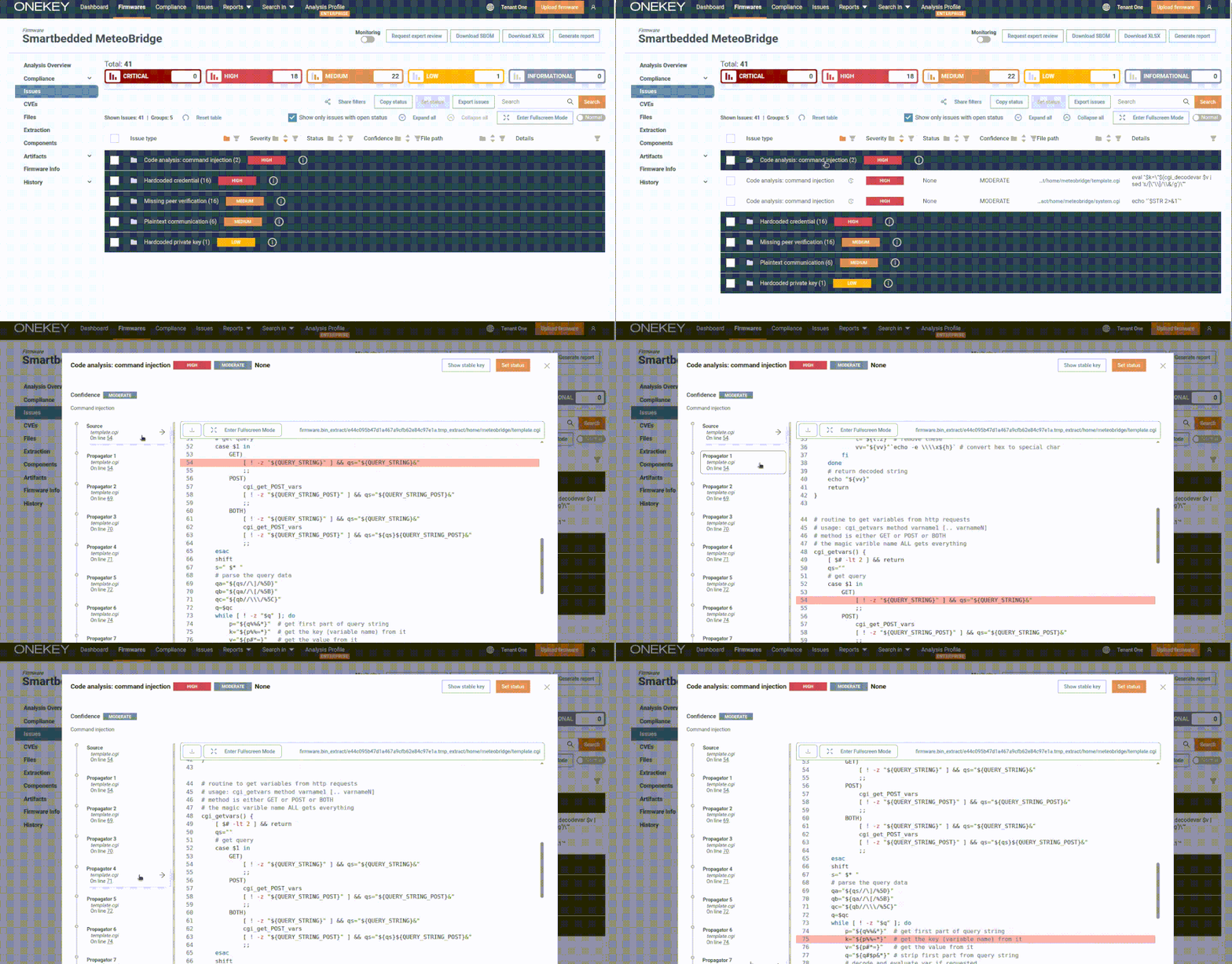
    Specifically, the web interface exposes a “template.cgi” script through “/cgi-bin/template.cgi,” which is vulnerable to command injection stemming from the insecure use of eval calls, allowing an attacker to supply specially crafted requests to execute arbitrary code –

    curl -i -u meteobridge: meteobridge 
    'https://192.168.88.138/cgi-bin/template.cgi?$(id>/tmp/a)=whatever'

    Furthermore, ONEKEY said the vulnerability can be exploited by unauthenticated attackers due to the fact that the CGI script is hosted in a public directory without requiring any authentication.

    “Remote exploitation through a malicious webpage is also possible since it’s a GET request without any kind of custom header or token parameter,” security researcher Quentin Kaiser noted back in May. “Just send a link to your victim and create img tags with the src set to ‘https://subnet.a/public/template.cgi?templatefile=$(command).’”

    CIS Build Kits

    There are currently no public reports referencing how CVE-2025-4008 is being exploited in the wild. The vulnerability was addressed in Meteobridge version 6.2, released on May 13, 2025.

    Also added by CISA to the KEV catalog are four other flaws –

    • CVE-2025-21043 (CVSS score: 8.8) – Samsung mobile devices contain an out-of-bounds write vulnerability in libimagecodec.quram.so that could allow remote attackers to execute arbitrary code.
    • CVE-2017-1000353 (CVSS score: 9.8) – Jenkins contains a deserialization of untrusted data vulnerability that could allow unauthenticated remote code execution, bypassing denylist-based protection mechanisms.
    • CVE-2015-7755 (CVSS score: 9.8) – Juniper ScreenOS contains an improper authentication vulnerability that could allow unauthorized remote administrative access to the device.
    • CVE-2014-6278, aka Shellshock (CVSS score: 8.8) – GNU Bash contains an OS command injection vulnerability that could allow remote attackers to execute arbitrary commands via a crafted environment.

    In light of active exploitation, Federal Civilian Executive Branch (FCEB) agencies are required to apply the necessary updates by October 23, 2025, for optimal protection.


    Source: thehackernews.com…

  • Confucius Hackers Hit Pakistan With New WooperStealer and Anondoor Malware

    Confucius Hackers Hit Pakistan With New WooperStealer and Anondoor Malware

    Oct 02, 2025Ravie LakshmananMalware / Cyber Espionage

    The threat actor known as Confucius has been attributed to a new phishing campaign that has targeted Pakistan with malware families like WooperStealer and Anondoor.

    “Over the past decade, Confucius has repeatedly targeted government agencies, military organizations, defense contractors, and critical industries — especially in Pakistan – using spear-phishing and malicious documents as initial access vectors,” Fortinet FortiGuard Labs researcher Cara Lin said.

    Confucius is a long-running hacking group that’s believed to have been active since 2013 and operating across South Asia. Recent campaigns undertaken by the threat actor have employed a Python-based backdoor called Anondoor, signaling an evolution of the group’s tradecraft and its technical agility.

    DFIR Retainer Services

    One of the attack chains documented by Fortinet targeted users in Pakistan sometime in December 2024, tricking recipients into opening a .PPSX file, which then triggers the delivery of WooperStealer using DLL side-loading techniques.

    A subsequent attack wave observed in March 2025 has been found to employ Windows shortcut (.LNK) files to unleash the malicious WooperStealer DLL, again launched using DLL side-loading, to steal sensitive data from compromised hosts.

    Another .LNK file spotted in August 2025 also leveraged similar tactics to sideload a rogue DLL, only this time the DLL paves the way for Anondoor, a Python implant that’s designed to exfiltrate device information to an external server and await further tasks to execute commands, take screenshots, enumerate files and directories, and dump passwords from Google Chrome.

    It’s worth noting that the threat actor’s use of Anondoor was documented in July 2025 by Seebug’s KnownSec 404 Team.

    “The group has demonstrated strong adaptability, layering obfuscation techniques to evade detection and tailoring its toolset to align with shifting intelligence-gathering priorities,” Fortinet said. “Its recent campaigns not only illustrate Confucius’ persistence but also its ability to pivot rapidly between techniques, infrastructure, and malware families to maintain operational effectiveness.”

    CIS Build Kits

    The disclosure comes as K7 Security Labs detailed an infection sequence associated with the Patchwork group that commences with a malicious macro that’s designed to download a .LNK file containing PowerShell code responsible for downloading additional payloads and leveraging DLL side-loading to launch the primary malware while simultaneously displaying a decoy PDF document.

    The final payload, for its part, establishes contact with the threat actor’s command-and-control (C2) server, gathers system information, and retrieves an encoded instruction that’s subsequently decrypted for execution using cmd.exe. It’s also equipped to take screenshots, upload files from the machine, and download files from a remote URL and save them locally in a temporary directory.

    “The malware waits for a configurable period and retries sending the data up to 20 times, tracking failures to ensure persistent and stealthy data exfiltration without alerting the user or security systems,” the company said.


    Source: thehackernews.com…

  • Alert: Malicious PyPI Package soopsocks Infects 2,653 Systems Before Takedown

    Alert: Malicious PyPI Package soopsocks Infects 2,653 Systems Before Takedown

    Oct 02, 2025Ravie LakshmananPython / Malware

    Malicious PyPI Package

    Cybersecurity researchers have flagged a malicious package on the Python Package Index (PyPI) repository that claims to offer the ability to create a SOCKS5 proxy service, while also providing a stealthy backdoor-like functionality to drop additional payloads on Windows systems.

    The deceptive package, named soopsocks, attracted a total of 2,653 downloads before it was taken down. It was first uploaded by a user named “soodalpie” on September 26, 2025, the same date the account was created.

    “While providing this capability, it exhibits behavior as a backdoor proxy server targeting Windows platforms, using automated installation processes via VBScript or an executable version,” JFrog said in an analysis.

    The executable (“_AUTORUN.EXE”) is a compiled Go file that, besides including a SOCKS5 implementation as advertised, is also designed to run PowerShell scripts, set firewall rules, and relaunch itself with elevated permissions. It also carries out basic system and network reconnaissance, including Internet Explorer security settings and Windows installation date, and exfiltrates the information to a hard-coded Discord webhook.

    DFIR Retainer Services

    “_AUTORUN.VBS,” the Visual Basic Script launched by the Python package in versions 0.2.5 and 0.2.6, is also capable of running a PowerShell script, which then downloads a ZIP file containing the legitimate Python binary from an external domain (“install.soop[.]space:6969”) and generates a batch script that’s configured to install the package using the “pip install” command and run it.

    The PowerShell script then invokes the batch script, causing the Python package to be executed, which, in turn, elevates itself to run with administrative privileges (if not already), configure firewall rules to allow UDP and TCP communication via port 1080, install as a service, maintain communication with a Discord webhook, and set up persistence on the host using a scheduled task to make sure it automatically starts upon a system reboot.

    “soopsocks is a well-designed SOCKS5 proxy with full bootstrap Windows support,” JFrog said. “However, given the way it performs and actions it takes during runtime, it shows signs of malicious activity, such as firewall rules, elevated permissions, various PowerShell commands, and the transfer from simple, configurable Python scripts to a Go executable with hardcoded parameters, version with reconnaissance capabilities to a predetermined Discord webhook.”

    The disclosure comes as npm package maintainers have raised concerns related to a lack of native 2FA workflows for CI/CD, self-hosted workflow support for trusted publishing, and token management following sweeping changes introduced by GitHub in response to a growing wave of software supply chain attacks, Socket said.

    Earlier this week, GitHub said it will shortly revoke all legacy tokens for npm publishers and that all granular access tokens for npm will have a default expiration of seven days (down from 30 days) and a maximum expiration of 90 days, which used to be unlimited previously.

    CIS Build Kits

    “Long-lived tokens are a primary vector for supply chain attacks. When tokens are compromised, shorter lifetimes limit the window of exposure and reduce potential damage,” it said. “This change brings npm in line with security best practices already adopted across the industry.”

    It also comes as the software supply chain security firm released a free tool called Socket Firewall that blocks malicious packages at install time across npm, Python, and Rust ecosystems, giving developers the ability to safeguard their environments against potential threats.

    “Socket Firewall isn’t limited to protecting you from problematic top-level dependencies. It will also prevent the package manager from fetching any transitive dependency that is known to be malicious,” the company added.


    Source: thehackernews.com…

  • Google Mandiant Probes New Oracle Extortion Wave Possibly Linked to Cl0p Ransomware

    Google Mandiant Probes New Oracle Extortion Wave Possibly Linked to Cl0p Ransomware

    Oct 02, 2025Ravie LakshmananRansomware / Threat Intelligence

    Google Mandiant and Google Threat Intelligence Group (GTIG) have disclosed that they are tracking a new cluster of activity possibly linked to a financially motivated threat actor known as Cl0p.

    The malicious activity involves sending extortion emails to executives at various organizations and claiming to have stolen sensitive data from their Oracle E-Business Suite.

    “This activity began on or before September 29, 2025, but Mandiant’s experts are still in the early stages of multiple investigations, and have not yet substantiated the claims made by this group,” Genevieve Stark, Head of Cybercrime and Information Operations Intelligence Analysis at GTIG, told The Hacker News in a statement.

    DFIR Retainer Services

    Mandiant CTO Charles Carmakal described the ongoing activity as a “high-volume email campaign” that’s launched from hundreds of compromised accounts, with evidence suggesting that at least one of those accounts has been previously associated with activity from FIN11, which is a subset within the TA505 group.

    FIN11, per Mandiant, has engaged in ransomware and extortion attacks as far back as 2020. Previously, it was linked to the distribution of various malware families like FlawedAmmyy, FRIENDSPEAK, and MIXLABEL.

    “The malicious emails contain contact information, and we’ve verified that the two specific contact addresses provided are also publicly listed on the Cl0p data leak site (DLS),” Carmakal added. “This move strongly suggests there’s some association with Cl0p, and they are leveraging the brand recognition for their current operation.”

    That said, Google said it does not have any evidence on its own to confirm the alleged ties, despite similarities in tactics observed in past Cl0p attacks. The company is also urging organizations to investigate their environments for evidence of threat actor activity.

    It’s currently not clear how initial access is obtained. However, according to Bloomberg, it’s believed that the attackers compromised user emails and abused the default password reset function to gain valid credentials of internet-facing Oracle E-Business Suite portals, citing information shared by Halycon.

    CIS Build Kits

    The Hacker News has reached out to Oracle for further comment about the extortion campaign, and will update the story if we hear back.

    In recent years, the highly prolific Cl0p group has been attributed to a number of attack waves exploiting zero-day flaws in Accellion FTA, SolarWinds Serv-U FTP, Fortra GoAnywhere MFT, and Progress MOVEit Transfer platforms, successfully breaching thousands of organizations.


    Source: thehackernews.com…

  • Automating Pentest Delivery: 7 Key Workflows for Maximum Impact

    Automating Pentest Delivery: 7 Key Workflows for Maximum Impact

    Penetration testing is critical to uncovering real-world security weaknesses. With the shift into continuous testing and validation, it is time we automate the delivery of these results.

    The way results are delivered hasn’t kept up with today’s fast-moving threat landscape. Too often, findings are packaged into static reports, buried in PDFs or spreadsheets, and handed off manually to already-overloaded IT and engineering teams. By the time remediation begins, days or even weeks may have passed since the issues were first discovered.

    As we explored in our recent article on how automation is redefining pentest delivery, static, manual processes no longer cut it. Security teams need faster insights, cleaner handoffs, and more consistent workflows if they want to keep pace with modern exposure management.

    That’s where automation makes the difference, ensuring findings move seamlessly from discovery to remediation in real time.

    Where Should You Start?

    Knowing automation matters is only the first step. The bigger challenge is understanding where to start. Not every workflow carries equal impact, and trying to automate everything at once can be overwhelming.

    This article focuses on the seven key workflows that deliver the greatest immediate value.

    By automating these first, security teams can accelerate delivery, reduce friction, and build the foundation for a modern, scalable approach to penetration test delivery.

    Platforms like PlexTrac help automate pentest finding delivery in real time through robust, rule-based workflows. (No waiting for the final report!)

    1. Create Tickets for Remediation When Findings Are Discovered

    One of the most powerful ways to accelerate penetration test delivery is by integrating findings directly into the tools that engineering and IT teams already use. Instead of manually transcribing vulnerabilities into Jira, ServiceNow, or Azure DevOps, automation can create remediation tickets the moment findings are published.

    This ensures findings reach the right teams without delay, while eliminating the risk of human error during handoff. For organizations with multiple stakeholders — from internal IT groups to external clients — automated ticketing ensures everyone works within familiar systems, without adding new friction. The result is faster remediation cycles, bidirectional visibility between teams, and ensuring all findings are tracked and resolved promptly.

    2. Auto-Close Informational Findings

    Not every discovery requires action. Informational findings, while valuable for historical context, can clutter dashboards and distract teams from higher-priority risks. By automatically closing findings tagged as informational during scan ingestion, organizations can reduce triage noise and keep workflows streamlined.

    This automation helps security leaders ensure their teams stay focused on what truly matters, while still retaining visibility into lower-level data if needed. It’s a simple but effective way to declutter queues, improve dashboard accuracy, and give teams back valuable time.

    3. Send Real-Time Alerts for Critical Findings

    Critical vulnerabilities discovered in active environments need immediate attention, often before a report is finalized. With automation, real-time alerts can be pushed directly to communication channels like Slack, Microsoft Teams, email, or even text using custom webhooks based on the severity of the finding.

    This workflow ensures high-severity issues are escalated instantly, enabling faster response and reducing risk exposure. In many cases, alerts can be paired with auto-ticket creation, sending findings to the right remediation team the moment they’re identified. This proactive approach helps organizations shorten the time from discovery to mitigation.

    4. Request Proofreading of Draft Findings

    Delivering high-quality penetration tests requires collaboration and potentially multiple levels of review. Instead of sending manual messages asking teammates to review a draft or running into duplicate versioning issues, automation can trigger real-time notifications when findings are ready for proofreading.

    This workflow promotes stronger peer review practices, reduces communication overhead, and helps teams scale their quality assurance process without slowing delivery. For junior analysts, it provides a structured way to involve more experienced team members in the editing process, ultimately improving the end deliverable.

    5. Send Alerts When Findings Are Ready for Retest

    Closing the loop on vulnerabilities is just as important as identifying them in the first place. Retesting is often delayed because communication between testing and remediation teams breaks down. By automating alerts when findings are ready for retest, organizations ensure timely follow-up and avoid SLA misses.

    This workflow helps teams align more effectively, improves accountability, and reduces the risk of lingering vulnerabilities. It’s a small but high-impact automation that strengthens trust in the overall pentesting process by ensuring that vulnerabilities are truly resolved.

    6. Auto-Assign Findings to Users Based on Role, Team, or Asset Type

    Findings can quickly get lost in the shuffle if they’re not routed correctly. Manual assignment leads to delays, confusion, and even rework when issues land with the wrong team or individual. Automating assignment rules based on attributes like asset type, vulnerability category, or team role ensures findings are delivered directly to the subject matter experts best equipped to address them.

    This targeted delivery not only speeds up triage but also reduces human error and boosts overall efficiency. Whether findings need to go to a specific department, system owner, or regional team, auto-assignment builds clarity into the remediation process and ensures accountability from day one.

    7. Send Finding Updates to Client Portals or Alert Clients Directly

    For service providers, keeping clients informed during and after a pentest is critical for trust and satisfaction. Instead of relying on periodic emails or manual updates, automation can send findings directly into client-facing portals or dashboards. Clients can also receive real-time alerts for critical issues, ensuring they have immediate visibility into high-severity risks.

    This creates a bridge between security providers and their clients, enabling faster responses and stronger collaboration so providers can position themselves as trusted partners.

    PlexTrac supports each of these capabilities through its Workflow Automation Engine. Explore their Workflow Automation Playbook for deeper guidance on how these automations work together.

    Automation Amplifies the Impact of Penetration Testers

    By eliminating repetitive tasks, reducing delays, and ensuring findings reach the right people at the right time, automation frees teams to focus on what matters most: protecting the organization.

    The seven workflows we’ve outlined are not only practical starting points, but also building blocks for more advanced automation in the future. Whether it’s auto-assigning findings, streamlining retests, or delivering updates directly to stakeholders, each step helps create a more resilient, efficient, and collaborative security practice.

    Want to see what automated pentest workflows look like in action? Platforms like PlexTrac help teams unify and accelerate delivery, remediation, and closure in one platform, enabling real-time delivery and standardized workflows across the entire vulnerability lifecycle.

    Found this article interesting? This article is a contributed piece from one of our valued partners. Follow us on Google News, Twitter and LinkedIn to read more exclusive content we post.


    Source: thehackernews.com…

  • ThreatsDay Bulletin: CarPlay Exploit, BYOVD Tactics, SQL C2 Attacks, iCloud Backdoor Demand & More

    ThreatsDay Bulletin: CarPlay Exploit, BYOVD Tactics, SQL C2 Attacks, iCloud Backdoor Demand & More

    Oct 02, 2025Ravie LakshmananThreat Intelligence / Cyber Attacks

    From unpatched cars to hijacked clouds, this week’s Threatsday headlines remind us of one thing — no corner of technology is safe. Attackers are scanning firewalls for critical flaws, bending vulnerable SQL servers into powerful command centers, and even finding ways to poison Chrome’s settings to sneak in malicious extensions.

    On the defense side, AI is stepping up to block ransomware in real time, but privacy fights over data access and surveillance are heating up just as fast.

    It’s a week that shows how wide the battlefield has become — from the apps on our phones to the cars we drive. Don’t keep this knowledge to yourself: share this bulletin to protect others, and add The Hacker News to your Google News list so you never miss the updates that could make the difference.

    1. Imgur Cuts U.K. Users, Investigation Still Open

      Imgur, a popular image hosting platform with more than 130 million users, has blocked access to users in the U.K. after regulators signalled their intention to impose penalties over concerns around children’s data.
      The U.K.’s data watchdog, the Information Commissioner’s Office (ICO), said it recently notified the platform’s parent company, MediaLab AI, of plans to fine Imgur after investigating its approach to age checks and handling of children’s personal data.
      The probe was launched
      earlier this March.
      “Imgur’s decision to restrict access in the U.K. is a commercial decision taken by the company,” the ICO
      said.
      “We have been clear that exiting the U.K. does not allow an organisation to avoid responsibility for any prior infringement of data protection law, and our investigation remains ongoing.”
      In a help page, Imgur
      confirmed U.K. users will not be able to log in, view content, or upload images.

    Every breach has one thing in common: people. Whether it’s a tricked employee, a careless click, or a decision to delay a patch — humans shape the outcome. Stay sharp, stay informed, and help others do the same.


    Source: thehackernews.com…

  • How to Close Threat Detection Gaps: Your SOC's Action Plan

    How to Close Threat Detection Gaps: Your SOC's Action Plan

    Running a SOC often feels like drowning in alerts. Every morning, dashboards light up with thousands of signals; some urgent, many irrelevant. The job is to find the real threats fast enough to keep cases from piling up, prevent analyst burnout, and maintain client or leadership confidence.

    The toughest challenges, however, aren’t the alerts that can be dismissed quickly, but the ones that hide in plain sight. These tricky threats drag out investigations, create unnecessary escalations, and quietly drain resources over time.

    Why Detection Gaps Keep Opening

    What slows SOCs down isn’t the flood of alerts alone but the way investigations get split across disconnected tools. Intel in one platform, detonation in another, enrichment in a third; every switch wastes time. Across hundreds of cases, those minutes add up to stalled investigations, unnecessary escalations, and threats that linger longer than they should.

    Action Plan That Delivers 3× SOC Efficiency in Threat Detection

    SOC teams looking to close detection gaps have found one approach that works: building detection as a continuous workflow, where every step reinforces the next. Instead of stalling in disconnected tools, analysts move through a process that flows, from filtering alerts to detonating suspicious files to validating indicators.

    A recent ANY.RUN survey shows just how much this shift can change SOC performance:

    • 95% of SOC teams reported faster investigations
    • 94% of users said triage became quicker and clearer
    • 21 minutes saved on MTTR for each case
    • Up to 58% more threats identified overall
    3-step action plan with its impact when using ANY.RUN

    Behind these numbers is more than speed. SOCs that adopted this workflow reduced alert overload, gained clearer visibility into complex attacks, and built confidence in compliance and reporting. Teams also grew faster in expertise, as analysts learned by doing rather than relying solely on static reports.

    So how are these numbers possible? The answer lies in three practical steps SOC teams have already put into action.

    Let’s look at how this plan works, and how you can implement it in your own workflows.

    Step 1: Expand Threat Coverage Early

    The earlier a SOC can spot an incident, the faster it can respond. Threat Intelligence Feeds give analysts fresh, actionable IOCs drawn from the latest malware campaigns; IPs, domains, and hashes seen in real-world attacks. Instead of chasing alerts blindly, teams start with data that reflects what’s happening across the threat landscape right now.

    TI Feeds as your first step in threat detection

    With this early coverage, SOCs gain three key advantages: they catch incidents sooner, stay aligned with current threats, and cut down on noise that clutters Tier 1. In practice, that means a 20% decrease in Tier 1 workload and fewer escalations eating into senior analysts’ time.

    Don’t let detection gaps slow your team down. Start with the 3-level process today and give your SOC the clarity and speed it needs.

    Try ANY.RUN now

    The best part is that Threat Intelligence Feeds are available in multiple formats with simple integration options, so they can plug directly into your existing SIEM, TIP, or SOAR setup without disrupting workflows.

    By filtering out duplicates and irrelevant signals at the start, Threat Feeds free up resources and ensure analysts focus on the alerts that actually matter.

    Step 2: Streamline Triage & Response with Interactive Sandbox

    Once alerts are filtered, the next challenge is proving what’s left. An interactive sandbox becomes the SOC’s proving ground. Instead of waiting for static reports, analysts can detonate suspicious files and URLs in real time, watching behavior unfold step by step.

    This approach exposes what most automated defenses miss; payloads that need clicks to activate, staged downloads that appear over time, and evasive tactics designed to fool passive detection.

    ANY.RUN’s sandbox analyzing complex threat

    The result is faster, clearer answers:

    • Evasive attacks exposed before they can escalate
    • Actionable threat reports generated for quick response
    • Routine tasks minimized with automated investigations

    In practice, SOCs achieve a 15-second median detection time, turning what used to be long, uncertain investigations into rapid, decisive outcomes.

    By combining real-time visibility with automation, the sandbox gives specialists of all levels the confidence to act quickly, while freeing senior staff from spending hours on routine triage.

    Step 3: Strengthen Proactive Defense with Threat Intelligence Lookup

    Even with full sandbox results, one question always remains: has this threat been seen before? Knowing whether an IOC is part of a fresh campaign or one already circulating across industries can completely change how a SOC responds.

    That’s why the third step is implementing Threat Intelligence Lookup. By tapping into live attack data contributed by more than 15,000 SOCs worldwide, analysts instantly enrich their findings and connect isolated alerts to wider patterns.

    TI Lookup search of attack and its relevant sandbox analyses

    The advantages are clear:

    • Hidden threats uncovered through proactive hunting
    • Greater incident clarity with rich historical context
    • Real-time visibility into evolving campaigns

    With access to 24× more IOCs than typical isolated sources, security professionals can validate faster, close tickets sooner, and anticipate what might be coming next.

    This final step ensures that every investigation ends with stronger evidence; not just a snapshot of one case, but an understanding of how it fits into the bigger threat landscape.

    Build a Stronger SOC With a Unified Detection Workflow

    Closing detection gaps is possible by creating a workflow where every stage strengthens the next. With early filtering from Threat Feeds, real-time visibility from the sandbox, and global context from Lookup, SOCs move from fragmented detection to a continuous process that delivers measurable results: faster triage, fewer escalations, and up to 3× greater efficiency in threat detection.

    Organizations worldwide are already seeing the benefits:

    • 74% of Fortune 100 companies use ANY.RUN to reinforce SOC operations
    • 15,000+ organizations have integrated it into their detection workflows
    • 500,000+ users rely on it daily for malware analysis and threat intelligence

    Boost your detection rate, cut investigation time, and strengthen SOC efficiency.

    Connect with ANY.RUN’s experts to explore how this approach can work for your team.

    Found this article interesting? This article is a contributed piece from one of our valued partners. Follow us on Google News, Twitter and LinkedIn to read more exclusive content we post.


    Source: thehackernews.com…
  • Warning: Beware of Android Spyware Disguised as Signal Encryption Plugin and ToTok Pro

    Warning: Beware of Android Spyware Disguised as Signal Encryption Plugin and ToTok Pro

    Cybersecurity researchers have discovered two Android spyware campaigns dubbed ProSpy and ToSpy that impersonate apps like Signal and ToTok to target users in the United Arab Emirates (U.A.E.).

    Slovak cybersecurity company ESET said the malicious apps are distributed via fake websites and social engineering to trick unsuspecting users into downloading them. Once installed, both the spyware malware strains establish persistent access to compromised Android devices and exfiltrate data.

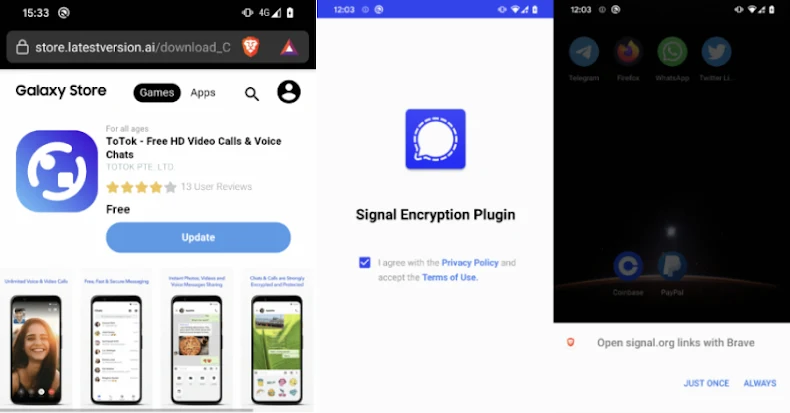
    “Neither app containing the spyware was available in official app stores; both required manual installation from third-party websites posing as legitimate services,” ESET researcher Lukáš Štefanko said. Notably, one of the websites distributing the ToSpy malware family mimicked the Samsung Galaxy Store, luring users into manually downloading and installing a malicious version of the ToTok app.”

    The ProSpy campaign, discovered in June 2025, is believed to have been ongoing since 2024, leveraging deceptive websites masquerading as Signal and ToTok to host booby-trapped APK files that claim to be upgrades to the respective apps, namely Signal Encryption Plugin and ToTok Pro.

    The use of ToTok as a lure is no coincidence, as the app was removed from Google Play and Apple App Store in December 2019 due to concerns that it acted as a spying tool for the U.A.E. government, harvesting users’ conversations, locations, and other data.

    DFIR Retainer Services

    The developers of ToTok subsequently went on to claim the removal was an “attack perpetrated against our company by those who hold a dominant position in this market” and that the app does not spy on users.

    The rogue ProSpy apps are designed to request permissions to access contacts, SMS messages, and files stored on the device. It’s also capable of exfiltrating device information.

    ESET said its telemetry also flagged another Android spyware family actively distributed in the wild and targeting users in the same region around the same time ProSpy was detected. The ToSpy campaign, which likely began on June 30, 2022, and is currently ongoing, has leveraged fake sites impersonating the ToTok app to deliver the malware.

    The regionally focused campaigns center around stealing sensitive data files, media, contacts, and chat backups, with the ToTok Pro app propagated in the ProSpy cluster featuring a “CONTINUE” button that, when tapped, redirects the user to the official download page in the web browser and instructs them to download the actual app.

    “This redirection is designed to reinforce the illusion of legitimacy,” ESET said. “Any future launches of the malicious ToTok Pro app will instead open the real ToTok app, effectively masking the spyware’s presence. However, the user will still see two apps installed on the device (ToTok and ToTok Pro), which could be suspicious.”

    The Signal Encryption Plugin, in a similar manner, includes an “ENABLE” button to deceive the users into downloading the legitimate encrypted messaging app by visiting the signal[.]org site. But unlike the case of ToTok Pro, the rogue Signal app icon is changed to impersonate Google Play Services once the victim grants it all the necessary permissions.

    Regardless of the app installed, the spyware embedded within it stealthily exfiltrates the data before the user clicks CONTINUE or ENABLE. This includes device information, SMS messages, contact lists, files, and a list of installed applications.

    “Similarly to ProSpy, ToSpy also includes steps designed to further deceive the victim into believing that the malware they just installed is a legitimate app,” Štefanko said. “After the user launches the malicious ToTok app, there are two possible scenarios: either the official ToTok app is installed on the device or it’s not.”

    “If the official ToTok app is not installed on the device, ToSpy attempts to redirect the user to the Huawei AppGallery, either through an already installed Huawei app or via the default browser, suggesting the user download the official ToTok app.”

    CIS Build Kits

    In the event the app is already installed on the device, it displays a fake screen to give the impression that it’s checking for app updates before seamlessly launching the official ToTok app. However, in the background, it collects user contacts, files matching certain extensions, device information, and ToTok data backups (*.ttkmbackup).

    To achieve persistence, both the spyware families run a foreground service that displays a persistent notification, use Android’s AlarmManager to repeatedly restart the foreground service if it gets terminated, and automatically launch the necessary background services upon a device reboot.

    ESET said the campaigns are being tracked differently due to differences in delivery methods and infrastructure, despite several commonalities in the malware deployed. It’s currently not known who is behind the activity.

    “Users should remain vigilant when downloading apps from unofficial sources and avoid enabling installation from unknown origins, as well as when installing apps or add-ons outside of official app stores, especially those claiming to enhance trusted services,” the company added.


    Source: thehackernews.com…